HP Poly Studio Desktop Calendar Integration
HP Poly Studio Desktop supports the ability for individual users to connect their O365 Calendars to their HP Poly Studio Desktop app. Depending on your organization’s security configuration and consent policies, the Poly Studio calendar integration may require approval from an O365 administrator.
To provide the necessary consent, an O365 administrator must have the Privileged Role Administrator permission. This is a privileged role in Microsoft Entra ID that grants users the ability to manage role assignments within Microsoft Entra ID and all aspects of Privileged Identity Management (PIM). The Poly Studio Calendar Integration requires 2 Microsoft graph API permissions:
- User.Read to read the user’s name and public profile information
- Calendars.Read to access calendar events
If an O365 administrator consent is not provided, then the user of the HP Poly Studio Desktop app will be informed that Admin consent is required and the user cannot submit for approval as seen below:
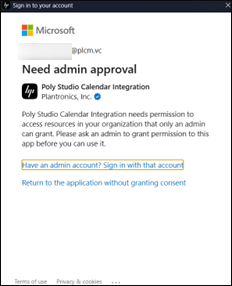
An O365 administrator consent for Poly Studio Calendar Integration can be provided in any of the following ways:
-
User Application Submission (User by User Access)
- In this workflow, users request consent submit applications for review and approval by O365 administrators.
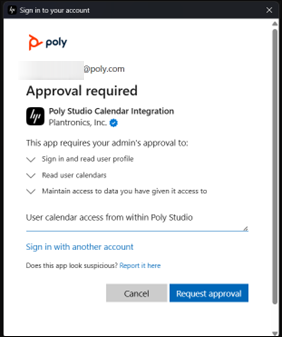
- This means that the application is requesting permission(s) which requires admin approval prior to use. After pressing Request approval, the justification will be sent to an administrator for review.
- Once the approval is sent, an administrator can log into the Entra ID portal and review a user’s approval request for Application id 14238f9a-7a89-40a2-ab87-8f1990e1a36d, which corresponds to the Poly Studio Calendar Integration application.
-
Direct Link (Tenant-Wide Access)
- To grant tenant-wide admin consent for the application without submitting a user request, a direct URL can be used: https://login.microsoftonline.com/\{tenant_id}/adminconsent?client_id=14238f9a-7a89-40a2-ab87-8f1990e1a36d, replacing {tenant_id} with the organization's Microsoft Entra tenant ID. The tenantId can be found in the Microsoft 365 admin center or Microsoft Entra admin center.
-
Admin Approval in the Desktop Application (Organization Wide Access)
- If an O365 admin user with the Privilege Role Administrator or Global admin activates the calendar integration, they can grant consent on behalf of the entire organization.
- When a user tries to Sync Calendar from within Poly Studio, they will be presented with an O365 consent flow to allow access to their calendar.
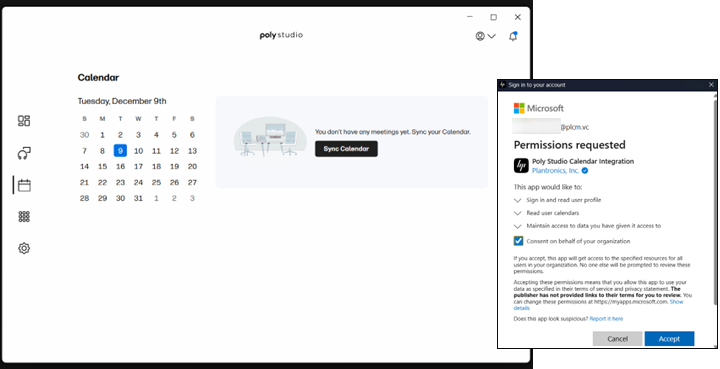
- After signing in with their office 365 credentials, an admin user will see a list of permissions requested by the application. By checking the Consent on behalf of your organization and selecting Accept, an admin will activate the calendar feature in Poly Studio for access to their personal calendar and approve access for other enterprise users to use the feature.