We’re excited to announce that Poly Lens Desktop, Mobile, and Room apps have all received a fresh new look and feel, and are now collectively called the HP Poly Studio App for short! Building on top of our existing device management functionality with Poly Lens Cloud, our rebranded suite of end-user apps now provides a more modernized and engaging user experience with new functionality such as a calendar integration for our HP Poly Studio Desktop app and quick settings for our Poly Studio Mobile app.
What Has Changed
While our core, powerful device management functionality has remained completely unchanged and continues to be the top priority for our platform, we’d like to share the specific updates we’ve made to each app to enhance the end user experience. Poly Lens Cloud and device management functionality has not changed. Only the names of our Desktop, Mobile, and Room apps along with the new logo for HP Poly Studio app have been added within our Poly Lens cloud.
Poly Lens Desktop App Updates
- New name: HP Poly Studio Desktop App
- New features: modernized UI/UX with a new home page and flat device inventory view, light/dark modes, calendar integration, HP docks support*, HP displays support**, HP AI PC support, redesigned wellbeing reminders, combined support page for application and device support, enhanced accessibility support
- Supported OS platforms: Windows x64, Windows ARM (new), Mac
- New Windows ARM deployment/upgrade path in Poly Lens Cloud
*Current HP Docks supported are the G6 series.
**Current HP Displays supported are the 3, 5, 7 series.
Poly Lens Mobile App Updates
- New name: HP Poly Studio Mobile App
- New features: modernized UI/UX, quick settings on device page
- Supported OS platforms (unchanged): iOS and Android
Poly Lens Room App Updates
- New name: HP Poly Studio Room App
- New features: modernized UI/UX
- Supported OS platforms (unchanged): Windows x64
HP Poly Studio Desktop and Mobile App Video Walkthroughs
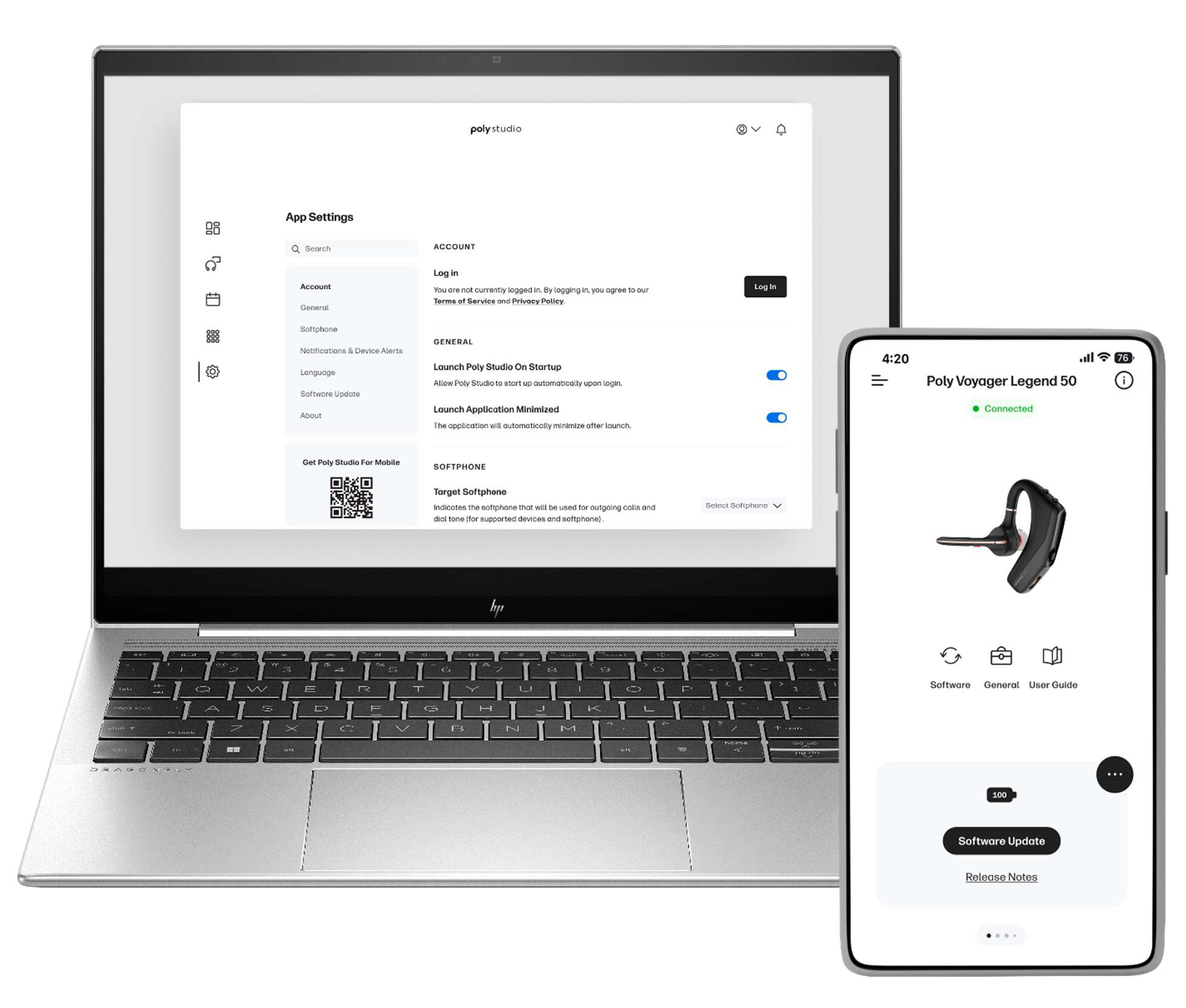
Watch the HP Poly Studio Desktop App video walkthrough to learn more here.
Watch the HP Poly Studio Mobile App video walkthrough to learn more here.
Why We’ve Made these Changes
Our existing Poly Lens platform with our powerful cloud portal serves a critical role in enabling effective hybrid work experiences within modern enterprises. IT Administrators and Device Managers have the ability to seamlessly configure, deploy, monitor, and manage end user devices across their organizations, while end users have optional control over their devices and individual experiences as they transition between different work environments.
Poly Lens Cloud for IT Admins and ITDMs to further increase control and ease of management, we also aim to serve the needs of end users for our Desktop, Mobile, and Room apps. With our HP Poly Studio rebrand and redesign, our goal is to provide an even more engaging and compelling end user experience that allows individuals to take their device management to the next level through the workday, helping drive the overall success of hybrid work in organizations. From here, we plan to add incremental enhancements over time to the end user experiences in these apps to increase the value to both end users and IT Admins & ITDMs as a uniquely differentiated platform.
How this Affects your Organization
Providing IT Admins and ITDMs ultimate control remains a top priority for us, and for this reason, the Poly Studio Desktop app will not automatically upgrade to the new HP Poly Studio version. This includes organizations with a policy to auto-update to the latest software version for Desktop. Therefore, to upgrade your organization to the new HP Poly Studio apps, you can manually do so within your Poly Lens Cloud Account, when you feel ready. For deploying our Poly Studio Desktop app to HP ARM-based AI PCs, we now have a new upgrade path starting from 5.0 for deployment to these devices, that is separate from our existing Windows x64 upgrade path. Windows x64 and Mac upgrade paths will remain unchanged, with the exception of those upgrading from Poly Lens Desktop 1.x version, which requires a stepped upgrade to version 2.3.1, then on to Poly Studio Desktop version 5.0.
For Poly Lens Mobile app, since it is not controlled or managed through the Poly Lens Cloud, end users will have control over when they upgrade to the new HP Poly Studio Mobile app.
Again, we are thrilled to announce this update in our suite of apps, and encourage you to try them within your organization soon!